
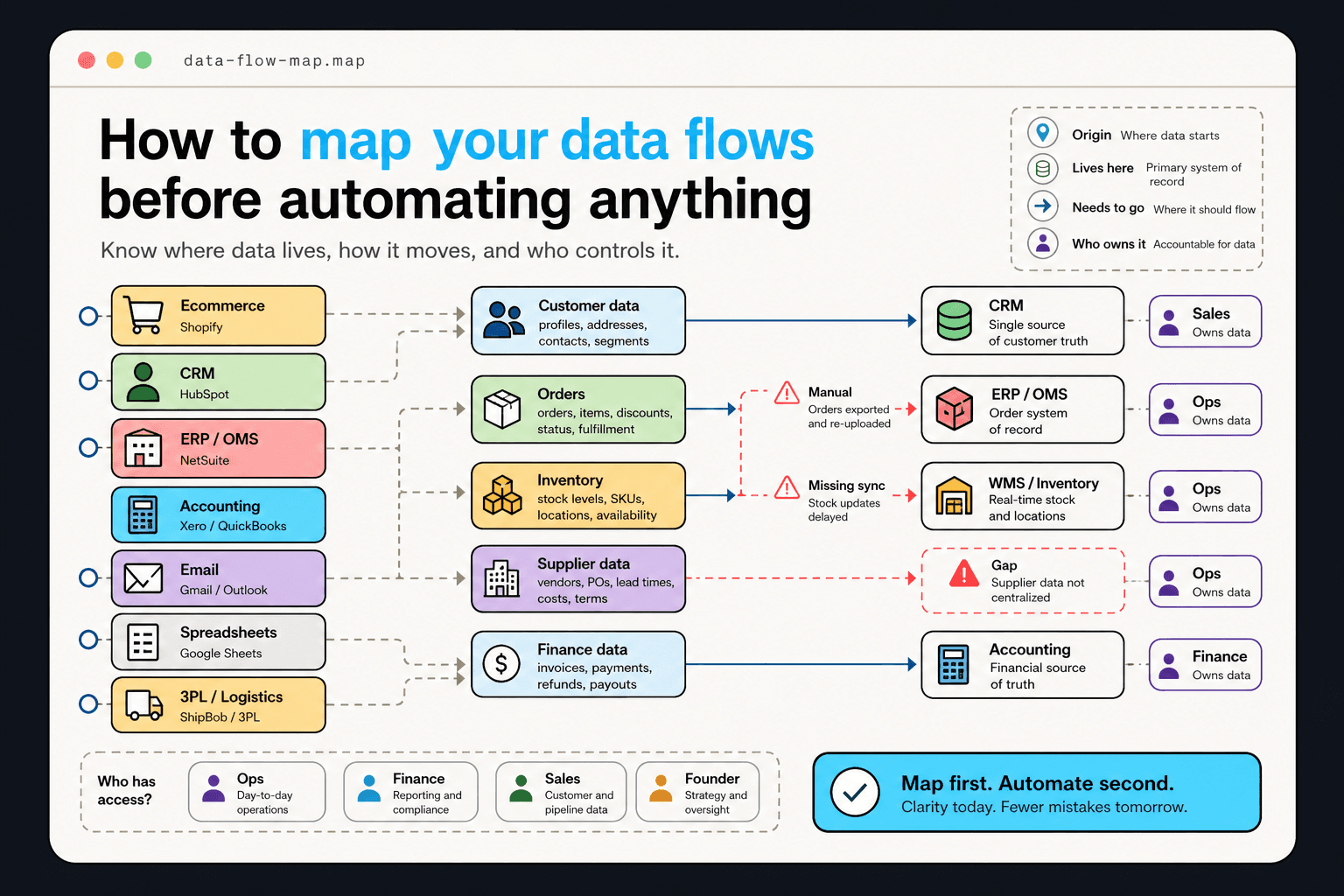
What a data flow map actually is
A data flow map answers four questions for every piece of business data: Where does it originate? Where does it live? Where does it need to go? Who can access it?
For a retail business, this means understanding that customer orders originate in the e-commerce platform, sync to the order management system, trigger records in the 3PL, and feed the accounting system — and that each of those handoffs has a different owner, a different format, and a different latency.
The systems inventory
Start by listing every tool the business uses that contains or processes business data: CRM, e-commerce platform, ERP, accounting software, email platform, spreadsheets, and any proprietary systems. For each, record: What data does it hold? Who manages it? Does it have an API? What other systems does it connect to?
This exercise almost always produces surprises. Critical business data living in a shared spreadsheet that nobody named as a 'system.' A CRM that technically connects to the accounting software but in practice nobody configured the sync. An API that exists but requires credentials that only one departed employee knew.
Identifying the data gaps
After mapping what exists, map what is missing: data the business needs for automation that does not currently exist in an accessible, structured form.
Common gaps: customer interaction history that lives in email threads rather than the CRM, inventory data that updates once a day rather than in real time, supplier lead time data that is maintained in a spreadsheet outside the order management system.
Ownership and access review
For each data source, document who owns it, who has access to it, and what approval is needed to build a connector to it. Data ownership questions that seem administrative often turn out to be political: a department head who considers their CRM data proprietary, a finance team that controls accounting access, a founder who is the only one who can authorize API credentials.
Surfacing these ownership dynamics during mapping prevents the worst kind of automation project failure: a workflow that is technically complete but cannot deploy because the data access was never approved.
From map to automation priority
After completing the map, automation priorities become clearer. Workflows that depend on well-connected, accessible, structured data are good near-term targets. Workflows that depend on manual data, gaps, or politically contested access belong further out in the roadmap.
The data map is not just a technical artifact — it is the honest version of what the business can automate today versus what it needs to fix first.
Ready to act?